📖 Read more: Oblivion Remastered: Return to Cyrodiil
🎙️ Microphones: The #1 Priority
All streamers agree: audio is more important than video. Viewers tolerate 720p video, but they won't tolerate bad audio. Invest first in a good microphone and then in everything else.
🏆 Blue Yeti X (€130-160)
The king of USB microphones. 4 polar patterns, LED metering, excellent sound quality. Plug & play USB. Ideal for beginners and intermediate streamers.
⭐ Elgato Wave:3 (€140-170)
USB condenser with Elgato Wave Link software — allows mixing multiple audio sources. Clipguard technology prevents distortion. Excellent for streaming and podcasting.
💰 HyperX SoloCast (€50-60)
The best budget option. USB, tap-to-mute, very good quality for the price. Ideal for your first streaming setup.
🎤 Shure SM7B (€350-400)
The professional standard. Dynamic microphone — requires an audio interface (Focusrite Scarlett, GoXLR). The choice of pro streamers and podcasters.
💡 Microphone Tips
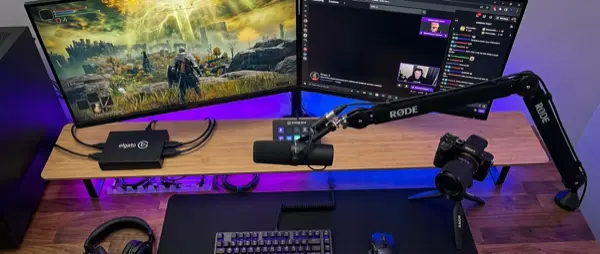
Use a boom arm (€25-50) instead of a desk stand — reduces vibrations and brings the mic closer to your mouth. Pop filter (€8-15) to avoid plosive sounds. Keep the mic 15-20cm from your mouth. Enable noise gate/suppression in OBS.
📖 Read more: Online Gaming Security: 2026 Guide
📷 Cameras: Facecam Setup
A facecam isn't mandatory, but it significantly increases engagement. Viewers want to see reactions, expressions, and personality — that's what differentiates you from faceless streamers.
🏆 Elgato Facecam Pro (€280-320)
4K60 camera built for streaming. Excellent autofocus, low-light performance, no barrel distortion. Plug & play USB-C.
⭐ Logitech Brio 4K (€150-200)
4K HDR camera with Windows Hello support. Good image quality, wide-angle lens, autofocus. Solid mid-range choice.
💰 Razer Kiyo Pro (€80-100)
1080p with excellent low-light performance. HDR support, FOV adjustment. The best value for money.
📷 Sony/Canon DSLR (€600+)
For pro-level quality. Sony ZV-1 Mark II, Canon EOS R50 with capture card. Cinematic depth of field, amazing low-light quality.
🎥 Capture Cards: For Console Streaming
If you stream PC games, you don't need a capture card — OBS does direct screen capture. But for consoles (PS5, Xbox, Switch) or dual PC setups, a capture card is essential. The Elgato HD60 X (€160-190) is the market standard: 4K30 / 1080p60 passthrough, USB 3.0, plug & play, compatible with OBS/Streamlabs/XSplit. Alternatives: AVerMedia Live Gamer Mini (€80) for budget or Elgato 4K60 Pro MK.2 (€250) for an internal PCIe solution.
📖 Read more: PC Gaming Mods: How to Get Started
💡 Lighting: The Hidden Difference
Photography and video are 90% lighting. An €80 camera with good lighting looks better than a €300 camera without lighting.
⭐ Elgato Key Light (€160)
The standard for streamers. 2800 lumens, adjustable color temperature, WiFi control via Stream Deck. Desk mount. Covers the face evenly.
💰 Ring Light (€25-60)
The most affordable option. 18″ ring light with tripod. Gives even lighting and a characteristic ring reflection in the eyes.
🎯 3-Point Lighting
Two key lights (left-right) and one back light for separation from the background. The pro setup used by top streamers.
🌈 RGB Ambient
Govee, Nanoleaf, Philips Hue for background lighting. Not essential but adds personality to the stream.
📖 Read more: Ray Tracing: What It Is and How It Works
💻 Second Monitor & Stream Deck
A second monitor is almost essential for streaming. Use it for chat, OBS preview, alerts, and dashboard. You don't need anything expensive — a 1080p 24″ IPS at €100-150 is enough.
The Elgato Stream Deck (€130-250 depending on version) is a game changer. Programmable buttons for: switching scenes, mute/unmute, playing sound effects, controlling lighting, social media posts, and much more. You can start with the Stream Deck Mini (6 buttons, €70) or the free Stream Deck Mobile app.
🟢 Green Screen & Background
A green screen enables background removal in OBS, giving you a clean presentation without showing your room. Options: Elgato Green Screen (€140, collapsible), the budget option is a simple green fabric (€15-20) behind the chair. In 2026, OBS and NVIDIA Broadcast have AI background removal that works quite well without a green screen.
📖 Read more: Resident Evil Requiem: Return to Raccoon City
💰 Budget vs Premium Setup
🟢 Starter Setup (€200-350)
HyperX SoloCast (€55), Razer Kiyo (€80), Ring Light 18" (€30), Green fabric (€15), Boom arm (€25). You can produce excellent quality streams with this.
🟡 Mid-Range (€600-1,000)
Elgato Wave:3 (€150), Logitech Brio (€170), Elgato Key Light (€160), Stream Deck Mini (€70), HD60 X (€170). Professional results without going overboard.
🔴 Premium (€2,000+)
Shure SM7B + GoXLR (€700), Elgato Facecam Pro (€300), 2x Key Light (€320), Stream Deck XL (€250), 4K60 Pro MK.2 (€250), Elgato Green Screen (€140). The ultimate setup.
💡 Advice
Start budget, upgrade gradually. First mic, then lighting, then camera. Don't buy everything at once — master each tool before adding the next.
🔌 Cable Management
An underrated but critical piece. With a microphone, camera, capture card, lights, Stream Deck, and dual monitors, you have a lot of cables. Cable raceways (€10-20), velcro ties (€5), under-desk trays, and USB hubs keep the setup clean. If your desk shows on stream, clean cables = professional impression.
🔮 Final Thoughts
A streaming setup is an investment — but you don't need thousands of euros to get started. With €200-350 you can have excellent stream quality. Prioritize in order: audio > lighting > camera > extras. And remember: content and personality matter more than any equipment.