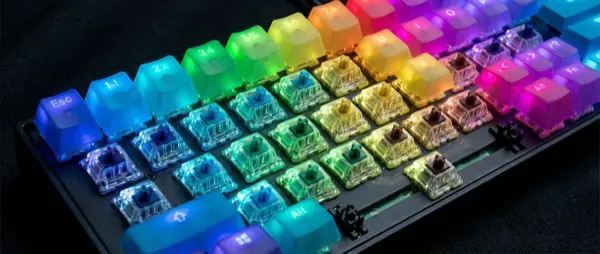
The mechanical keyboard is the foundation of every serious gaming setup. From the clicking of Cherry MX Blues to the buttery-smooth feel of Gateron Yellows, your switch choice defines the experience. This guide covers everything: switches, layouts, hot-swap, and the best models of 2026.
📖 Read more: Gaming Room Setup: Complete Guide 2026
Why Mechanical and Not Membrane?
A mechanical keyboard uses a separate mechanical switch for each key, as opposed to membrane keyboards that use a unified rubber dome layer. This offers significant advantages in both gaming and daily use.
Faster Response
Each switch activates at a specific actuation point (1.0-2.0mm). Precise, predictable, fast. Critical for competitive gaming.
Durability & Longevity
50-100 million keystroke endurance. Membrane keyboards lose their “tactile feel” in 1-2 years. A mechanical one lasts 5-10+ years.
Customization
Hot-swap sockets, custom keycaps, lubing, modding. The mechanical keyboard is a platform for personalization to your style.
Sound & Feel
Each switch type has a different sound and feel. From thocky linears to clicky blues — find your own style.
Switch Types: The Ultimate Guide
Switches are the heart of every mechanical keyboard. There are three basic categories that determine the feel, sound, and performance of your keyboard.
📖 Read more: Unreal Engine 6: A New Era of Graphics
🔧 Switch Type Comparison
| Characteristic | Linear | Tactile | Clicky |
|---|---|---|---|
| Feel | Smooth, consistent press | Bump at actuation point | Bump + audible click |
| Sound | Quiet - Medium | Medium | Loud - Very Loud |
| Gaming | ⭐⭐⭐⭐⭐ | ⭐⭐⭐⭐ | ⭐⭐⭐ |
| Typing | ⭐⭐⭐ | ⭐⭐⭐⭐⭐ | ⭐⭐⭐⭐ |
| Popular Switches | Cherry MX Red, Gateron Yellow, Razer Red | Cherry MX Brown, Gateron Brown, Holy Panda | Cherry MX Blue, Kailh Box White, Razer Green |
| Actuation Force | 45-50g | 45-67g | 50-60g |
"For competitive gaming, linear switches are the most popular choice among pro players. The smooth keystroke without a bump allows for faster double-tapping and more consistent input."
— TaeKeyboards, Switch Guide 2025
New Generation Switches 2026
2026 brings new switch technologies that are changing the game in the gaming keyboard market.
🚀 2026 Innovations
- Magnetic Hall Effect Switches: Analog detection with adjustable actuation point (0.1-4.0mm). Rapid Trigger support. Wooting, Razer, SteelSeries
- Optical Switches Gen 2: Light-based detection with no metal contact. Zero debounce, 100M keystroke lifespan. Razer, Gateron
- Rapid Trigger: Activation and deactivation with minimal movement (0.1mm). Game-changer for counter-strafing in CS2/Valorant
- Pre-lubed Factory Switches: Gateron G Pro 3.0, Cherry MX2A — factory-lubed for smooth feel without DIY
- Low-Profile Mechanical: Cherry MX Low Profile, Gateron LP — low profile with mechanical feel. Ideal for laptop-like typing + gaming
Layout: Which Size Is for You?
The layout determines how many keys your keyboard has and how much desk space it takes up. Generally, the smaller the layout, the more mouse room you have — but you lose keys.
Full-Size (100%)
104 keys. Numpad, arrows, function keys — everything present. Ideal for those who need a numeric keypad (MMO gamers, data entry).
TKL / 80%
87 keys. No numpad. The sweet spot for gaming: more mouse space, retains arrow keys and F-row. The most popular gaming size.
📖 Read more: VR Gaming 2026: The Best Games & Headsets
75% / 65%
75%: Compact with F-row. 65%: No F-row but with arrows. Trending in the custom keyboard community. Small footprint, excellent for FPS gaming.
60% / 40%
60%: Only the base layout (61 keys). 40%: Extreme. Layers and combos essential. For enthusiasts who want the ultimate minimal.
Features That Matter in 2026
Besides switches and layout, several features make a real difference in the daily gaming experience:
🌟 Critical Features
- Hot-Swap Sockets: Swap switches without soldering. Essential in 2026 — avoid keyboards without this
- Wireless (2.4GHz + Bluetooth): Dual connectivity with low latency (1ms polling). Tri-mode (USB + 2.4GHz + BT) is the standard
- RGB Per-Key: Customizable lighting per key. Sync with other peripherals (Razer Chroma, iCUE, Aura Sync)
- N-Key Rollover (NKRO): Registers all key presses simultaneously. Critical for complex key combos
- Onboard Memory: Store profiles on the keyboard itself. Take your settings anywhere without software
- Gasket Mount: The plate is supported by gaskets instead of screws — softer, bouncier typing feel. Premium feature
- Sound Dampening: Foam, silicone pads, tape mod for that “thocky” sound. Some keyboards have it factory-installed
Best Gaming Keyboards 2026
After extensive evaluation, these are the keyboards that stand out in each category:
Competitive Gaming (€150+)
🏆 Top Picks
| Model | Switches | Features | Price |
|---|---|---|---|
| Wooting 80HE | Hall Effect (Lekker) | Rapid Trigger, adjustable actuation, 75% layout | ~€200 |
| Razer Huntsman V3 Pro | Optical Gen 3 (Analog) | Rapid Trigger, magnetic sensing, excellent build | ~€250 |
| SteelSeries Apex Pro TKL (2024) | OmniPoint 2.0 (Magnetic) | 0.1-4.0mm actuation, OLED display, excellent software | ~€200 |
Mid-Range (€70-150)
⚡ Value Champions
| Model | Switches | Features | Price |
|---|---|---|---|
| Keychron Q1 Max | Gateron Jupiter (Hot-Swap) | Gasket mount, QMK/VIA, tri-mode wireless, aluminum case | ~€150 |
| Corsair K70 Max | MGX (Magnetic) | Rapid Trigger, iCUE RGB, full-size, aluminum frame | ~€180 |
| Logitech G Pro X TKL | GX Optical (Hot-Swap) | LIGHTSPEED wireless, per-key RGB, compact TKL | ~€130 |
Budget (Under €70)
💰 Budget-Friendly
| Model | Switches | Features | Price |
|---|---|---|---|
| Royal Kludge RK84 | RK or Gateron (Hot-Swap) | Tri-mode wireless, RGB, 75% layout, PBT keycaps | ~€55 |
| Redragon K556 Devarajas | Outemu (Hot-Swap) | Full-size, RGB, aluminum top plate, USB-C | ~€45 |
| Keychron C3 Pro | Gateron (Hot-Swap) | TKL, RGB, QMK/VIA support, wired, exceptional value | ~€35 |
"In 2026, Rapid Trigger has become practically mandatory for competitive FPS gaming. If you play CS2 or Valorant in ranked, a Hall Effect keyboard gives you a measurable advantage."
📖 Read more: Ace Combat 8 Wings of Theve: Next-Gen Aerial Combat
— Optimum Tech, Keyboard Reviews 2026
Keycaps & Customization
The custom keycap scene in 2026 is at its peak. Keycaps radically change the look and feel of your keyboard.
🎨 Keycap Materials
- ABS (Acrylonitrile Butadiene Styrene): Affordable, smooth, develops shine over time. Good for RGB shine-through
- PBT (Polybutylene Terephthalate): More durable, textured, doesn't develop shine. The preferred choice for enthusiasts
- POM (Polyoxymethylene): Exceptionally smooth, self-lubricating texture. Niche but superb feel
- Double-shot vs Dye-sub: Double-shot = legends that never fade. Dye-sub = more affordable, excellent durability
Buying Guide: Step by Step
📋 Buying Steps
- 1. Define Your Use: Competitive FPS → Hall Effect + Rapid Trigger. Mixed gaming → Linear mechanical. Typing + gaming → Tactile
- 2. Choose Layout: TKL/75% for most gamers. Full for numpad needs. 65% for minimal
- 3. Wired or Wireless? Wireless 2.4GHz in 2026 has no noticeable latency difference. Choose based on your setup
- 4. Hot-Swap = Must: Never buy a non-hot-swap keyboard in 2026. The flexibility to change switches is always worth it
- 5. Test Before Buying: Switch tester kits (€10-15) let you try different types before committing
Final Verdict
In 2026, the mechanical gaming keyboard market is in excellent shape. Hall Effect switches bring a revolution to competitive gaming with Rapid Trigger, budget keyboards (€35-55) offer features that were premium just 2 years ago, and the world of custom keyboard modding is more accessible than ever.
For competitive gaming, a Wooting 80HE or Razer Huntsman V3 Pro is the top investment. For all-around gaming + typing, a Keychron Q1 Max offers exceptional value. And if you want to start without breaking the bank, the Keychron C3 Pro at €35 proves that mechanical typing is now for everyone.