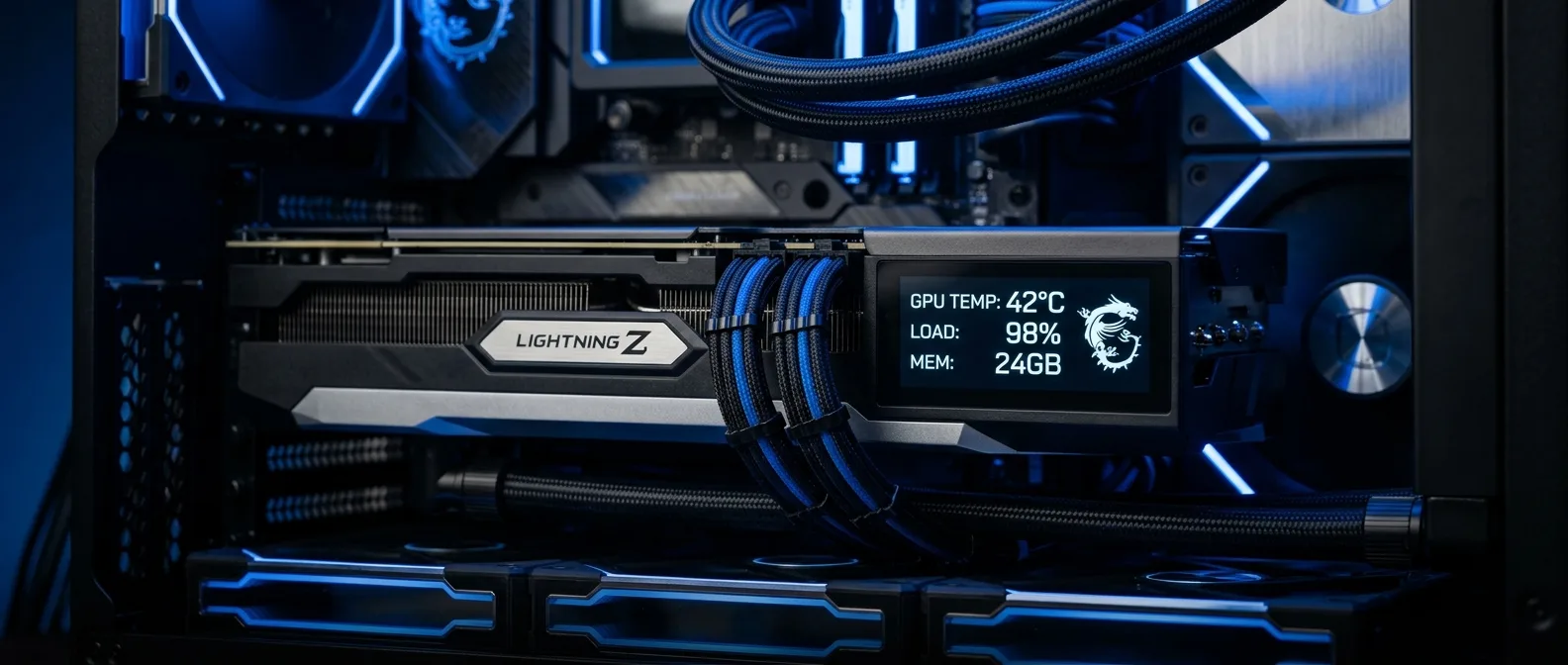
Two 12V-2x6 connectors, 1000W power envelope, and water cooling with a full-coverage block. If you thought the RTX 5090 wasn't extreme enough, MSI had other ideas.
At CES 2026, while most companies focused on AI solutions and chatbots, MSI decided to dig deeper into gaming hardware fanaticism. The result? The GeForce RTX 5090 32G Lightning Z — a graphics card that truly earns the "extreme" label in its DNA.
With just 1,300 units produced worldwide, the Lightning Z isn't targeting the average gamer. Not even the serious enthusiast, if we're being honest. This is the card for those who want to see where the RTX 5090 architecture's limits lie — and have roughly $4,700 to spend finding out.
📖 Read more: Ace Combat 8 Wings of Theve: Next-Gen Aerial Combat
⚡ When One Power Connector Isn't Enough
The Lightning Z's core selling point is simple: more watts, more performance. Where the RTX 5090 Founders Edition caps out at 575W through a single 12V-2x6 connector, MSI installed two. The result is an OC vBIOS at 800W and an Extreme vBIOS at 1,000W.
Is it excessive? Yes. Does it require a 1,500W+ PSU? Also yes. But when you see performance gains significantly outpacing the standard 5090, you start understanding why some people will make this leap.
MSI RTX 5090 Lightning Z Technical Specs
- GPU: Nvidia GB202 (21,760 CUDA cores)
- VRAM: 32GB GDDR7 @ 28 Gbps
- Boost Clock: 2,775 MHz (vs 2,410 MHz on FE)
- Power Limit: 800W (OC) / 1,000W (Extreme)
- Connectors: 2x 12V-2x6
- PSU Requirement: 1,500W+
- Cooling: 360mm AIO with full-coverage water block
- Weight: 2.8 kg (vs 1.8 kg on FE)
🎮 Water Cooling That Actually Makes Sense
MSI didn't add water cooling for show. The full-coverage copper water block covers the GPU, GDDR7 memory, and the PCB's 40-phase VRM. Current flows through a 3oz copper PCB that's — literally — overkill for anything beyond extreme overclocking.
The logic behind water cooling is undeniable. The standard RTX 5090 FE blows all that hot exhaust over your CPU socket and RAM. Here, with a 360mm radiator you can position anywhere in your case, you direct airflow where you want it — typically out of the system.
The catch is you need a case with proper radiator mounting. But if you're buying something that costs more than a used car, you probably already have decent case infrastructure.
📖 Read more: AI in Games: 6 Ways Artificial Intelligence is
📱 8-inch Display and Other Excesses
Perhaps the most impressive — or gimmicky, depending on your perspective — feature of the Lightning Z is the 8-inch display covering most of the card. It requires a separate USB cable to function and technically operates as a second display in Windows.
In theory, it sounds cool. In practice? It's a bit fiddly. You can display GPU statistics, looping videos, or — this actually happened — play Doom on it. But when you launch games, the display can flicker or revert to a small Windows desktop. Not a dealbreaker, but not the most polished experience either.
🔥 Performance That Justifies the Madness?
In benchmarks, the Lightning Z shows significant improvements over the RTX 5090 Founders Edition. The boost clock at 2,775 MHz (from 2,410 MHz) and extra watts deliver noticeable performance differences — especially in 4K gaming where the card can truly stretch its legs.
GDDR7 overclocking, however, remains artificially limited. Here's the paradox: MSI gives you 1,000W to play with, but NVIDIA keeps its hands on the memory controls.
For extreme overclockers — the real ones, those with liquid nitrogen and competition mindsets — there's even a 2,500W+ BIOS option. But that's for labs, not home gaming rigs.
The Price Problem
$4,700 for a gaming GPU. Let that sink in for a moment.
At the same price, you could buy an RTX Pro 6000 Blackwell Workstation Edition with triple the VRAM. Yes, it's slightly slower in games, but we're talking about professional hardware that does real work beyond gaming.
The truth is the Lightning Z doesn't target rational consumers. This is the card for collectors, extreme enthusiasts, or those who simply want the ultimate gaming hardware statement piece in their setup.
📖 Read more: Apex Legends 2026: Meta and Legends
🤔 Who Actually Needs This Thing?
In reality, very few people. If you're a content creator working with 8K video editing or AI workloads, the RTX Pro makes more logical sense. If you're a gamer wanting the best possible 4K experience, the standard RTX 5090 does the job for thousands less.
The Lightning Z is for that very specific group of people who have all the money in the world and want absolute bragging rights hardware. It's the Bugatti of gaming — technically impressive, urban legend status, and unreachable for 99.9% of us.
Temperatures
The full-coverage water block keeps temperatures low even at 800W. At 1,000W, naturally, things get more interesting.
Installation
Requires patience — 360mm radiator, USB for the display, dual power cables. This isn't a plug-and-play process.
Overclocking
In the right hands, it can break world records. For everyone else, the OC vBIOS suffices.
🔧 Practical Challenges
Beyond price, there are practical hurdles. The 1,500W+ PSU requirement isn't trivial — few manufacturers make such units, and they cost plenty. MSI ships its own MSI MPG Ai1600TS to reviewers, but that's not free with the card.
The included vertical mounting bracket is well-built and adjustable on X and Z axes. But you still need an ATX mid-tower or larger to fit the entire setup.
The display cables could be more elegant. A USB Type-A-to-C cable hanging from the card isn't the cleanest aesthetic we'd want in a build of this caliber.
The Race for "First"
MSI isn't alone in making extreme RTX 5090 variants. Asus has the ROG Matrix Platinum RTX 5090 — also limited to 1,000 units — with 800W TGP. But that one requires one of Asus's proprietary BTF motherboards to fully unlock its capabilities.
The Lightning Z works with any motherboard and PSU that has dual 12V-2x6 connectors. This simpler approach makes it more accessible — in terms of compatibility, not price.
🎯 Frequently Asked Questions
Can I install this in any PC?
No. You need a 1,500W+ PSU with dual 12V-2x6 connectors, a case that fits a 360mm radiator, and a motherboard that won't go into shock seeing a 2.8kg card.
Is the water cooling worth it?
In this case, yes. 800-1,000W demands serious cooling, and the full-coverage solution is more efficient than air. You also avoid roasting your other components.
What's the difference from the standard RTX 5090?
Significantly higher performance thanks to extra watts and higher boost clocks. We're talking 10-15% improvement in most games, but at triple the cost.
Sources: