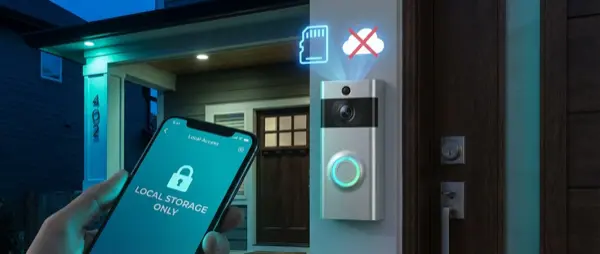
Cloud video doorbells — Ring, Nest, Blink — dominate the market, but they mean monthly subscriptions, dependence on third-party servers, and video data stored outside your home. In 2026, there are excellent alternatives that store locally — on microSD, NAS, or NVR — without any cloud. This means zero subscription costs, complete privacy, operation even when internet goes down, and full control over your own data. In this article, we analyze the best cloud-free video doorbells for 2026, with prices, specs, a comparison table, and installation guide.
Why Go Cloud-Free? Problems with Ring & Nest
Amazon (Ring) and Google (Nest) have created an ecosystem where your video doorbell is essentially a subscription device. Ring Basic Plan costs €3.99/month per camera or €13.99/month for Plus, meaning over €47-168 per year. Nest Aware starts at €6.99/month. Over 5 years, you pay more in subscriptions than the device's purchase price.
But cost isn't the only problem. The main issues:
- Data sharing with authorities: Amazon has admitted to giving Ring doorbell footage to police without warrants in over 11 cases. In Europe, GDPR provides some protection, but data sits on servers outside the EU.
- Data breaches: In 2023, Ring suffered a ransomware attack (ALPHV/BlackCat group) with user data leaks. Cloud-free doorbells don't have this risk — data stays on your local network.
- Latency & Reliability: Cloud doorbells send video to the cloud for processing, then send notifications. This means 2-8 second delays. A local doorbell notifies in <1 second.
- Internet dependency: If your ISP goes down or the cloud DNS fails, you lose access to your doorbell. Local doorbells work even without internet.
- End of support: Google discontinued the original Nest Secure, leaving users without updates. Open-source local systems don't depend on corporate decisions.
💡 Did you know?
According to a Mozilla Foundation study (2025), 89% of smart doorbells send data to third parties — advertisers, analytics companies, or government agencies. Cloud-free doorbells completely eliminate this issue.
Comparison Table: Cloud-Free Video Doorbells 2026
Below we compare the top cloud-free video doorbells you can buy in February 2026 in Europe:
| Model | Resolution | Storage | Power | PoE | Home Assistant | Price | Score |
|---|---|---|---|---|---|---|---|
| Reolink Video Doorbell WiFi | 2K+ (2560×1920) | microSD / NAS | Wired 16-24V AC | ❌ | ⭐⭐⭐⭐⭐ | €99 | 9.2/10 |
| Aqara G4 Video Doorbell | 1080p + 720p (dual) | microSD / HomeKit SV | Wired or 6x AA | ❌ | ⭐⭐⭐⭐ | €119 | 8.8/10 |
| UniFi G4 Doorbell Pro | 5MP (2560×1920) | UniFi Protect NVR | Wired or PoE | ✅ | ⭐⭐⭐⭐ | €199 | 9.0/10 |
| Amcrest AD410 | 2K (2048×1536) | microSD / Amcrest NVR | Wired 16-24V AC | ❌ | ⭐⭐⭐⭐ | €89 | 8.5/10 |
| Eufy Video Doorbell E340 | 2K dual cam | HomeBase / microSD | Wired 16-24V AC | ❌ | ⭐⭐⭐ | €179 | 8.6/10 |
| TP-Link Tapo D230S1 | 2K (2560×1440) | microSD / Tapo Hub | Wired or Battery | ❌ | ⭐⭐⭐ | €109 | 8.3/10 |
Reolink Video Doorbell WiFi — Best Value
The Reolink Video Doorbell WiFi is our top pick for 2026, and for good reason. It offers 2K+ resolution (2560×1920) with a wide 180° angle, supports 5GHz WiFi for more stable connection, and stores locally on microSD (up to 256GB) or NAS via FTP protocol.
Built-in AI person detection drastically reduces false alerts. Two-way audio with noise cancellation works excellently — you can talk to visitors even when you're not home, via the Reolink app. Key advantage: it supports RTSP stream, so it connects directly to Home Assistant, Frigate, Blue Iris, or any NVR.
Power comes via wired connection (16-24V AC), so it directly replaces an existing wired doorbell. Night vision with IR LEDs covers up to 5 meters. At €99, it's extremely competitive — you're essentially paying what 2 years of Ring subscription would cost, but with zero recurring fees.
Aqara G4 Video Doorbell — Ideal for Apple HomeKit
If you're in the Apple ecosystem, the Aqara G4 is the best doorbell choice. It supports HomeKit Secure Video (HSV), meaning Apple encrypts your video end-to-end and stores it on iCloud where nobody — not even Apple — can see it. Alternatively, you can store locally on microSD.
The G4 features a dual camera — one main 1080p camera and one secondary 720p that records simultaneously, enabling picture-in-picture (PiP). Smart detection includes face, animal, and package recognition. It works with wired power or 6 AA batteries — ideal for rentals or apartments without wired doorbells.
Home Assistant integration is via Matter/Zigbee (requires Aqara Hub), while HomeKit works out-of-the-box. At €119, the price is reasonable, especially considering HSV recordings don't count against your iCloud storage quota.
UniFi G4 Doorbell Pro — The Pro Choice
For those already with Ubiquiti equipment (Dream Machine, switches, APs), the UniFi G4 Doorbell Pro is the premium choice. It stands out with 5MP resolution, PoE (Power over Ethernet) support — one Ethernet cable for both power and data — and a built-in fingerprint reader for door unlocking.
Storage is exclusively via UniFi Protect, Ubiquiti's local NVR system. This means zero cloud, but requires a Cloud Key Gen2+ or Dream Machine Pro as NVR. It's an investment, but if you already have a UniFi network, the experience is premium: smooth live view, timeline scrubbing, smart detections, and package alerts.
Home Assistant connection is via the UniFi Protect integration — full access to live stream, motion events, and doorbell press events.
"After switching from Ring to UniFi G4 Doorbell Pro, I saved €168/year in subscriptions and notification speed improved dramatically — from 4-5 seconds to under 1 second."
— r/Ubiquiti user, January 2026
Installation: Wired, Battery & PoE
Installation depends on the power type. There are three main categories:
🔌 Wired Installation (AC)
Most cloud-free doorbells (Reolink, Amcrest, Eufy) run on 16-24V AC. If your home already has a wired doorbell, just replace the old one — the wiring is the same. If there's no existing wiring, you need a 16V AC transformer costing €10-20, installed in your electrical panel.
Tip for European apartments: Many apartment buildings have intercom systems with buzzers at the main entrance. You can place the video doorbell alongside or replace the buzzer unit. Check your building's regulations before drilling into walls.
🔋 Battery
The Aqara G4 and TP-Link Tapo D230S1 also work on batteries. Ideal for rentals, Airbnbs, or if you don't want to run wiring. Battery life ranges from 3 to 6 months depending on usage. Mounting can be done with screws or even 3M adhesive tape.
🌐 PoE (Power over Ethernet)
Only the UniFi G4 Doorbell Pro supports PoE. You need a Cat5e/Cat6 Ethernet cable from a PoE switch or injector to the mounting location. If you're renovating, run Ethernet to the front door — it will serve future upgrades too. PoE provides 100% reliability without WiFi issues.
📐 Placement
Ideal mounting height is 120-140 cm from ground level — chest height for an average adult, so the camera clearly captures faces. Make sure the viewing angle covers the entire entrance zone. Avoid mounting facing direct sunlight (backlight) or behind glass.
Home Assistant Integration: Automations & Frigate
The real power of a cloud-free video doorbell reveals itself when connected to Home Assistant. Through RTSP streams, any doorbell becomes part of a local, AI-powered security system.
🎥 Connection via RTSP
Reolink, Amcrest, and UniFi support RTSP (Real Time Streaming Protocol). Add the video stream as a camera in Home Assistant — either via generic camera integration or specific integrations (Reolink integration, UniFi Protect integration). Aqara devices connect via Zigbee/HomeKit Controller integration.
🤖 Frigate NVR — AI Person & Package Detection
Frigate is an open-source NVR add-on for Home Assistant that runs locally. It uses AI (OpenVINO, Google Coral TPU) for real-time object detection. Connect your doorbell's RTSP stream to Frigate and you get:
- Person detection: Notifications only when a person appears, ignoring animals, cars, shadows
- Package detection: Package recognition — “Package at your door” notification
- Face recognition: With DoubleTake or CompreFace, recognize family members and unlock automatically
- 24/7 recording: Record to NAS with retention policies (e.g., keep 30 days video, 90 days events)
⚡ Automation Examples
Some practical automations you can create:
- Screenshot notification: When doorbell rings, sends push notification to phone with visitor snapshot via Companion App.
- Auto-unlock: If Frigate recognizes a family member, automatically unlocks the smart lock (Nuki, Yale).
- Entry lights: After sunset, if motion is detected at the doorbell, entry lights turn on to 100% for 5 minutes.
- TTS announcement: When doorbell rings, Google Home/Alexa speakers announce “Someone is at the door.”
- Clip recording: Every doorbell press event saves a 30-second clip to a specific NAS folder.
Privacy & Network Security
A cloud-free video doorbell eliminates data leak risks to third parties, but requires proper network configuration for maximum security:
🔒 VLAN Isolation
Place cameras and doorbells on a separate VLAN (e.g., VLAN 30 — IoT) with no internet access — only to the local NVR/Home Assistant server. This way, even if a device is compromised, it can't send data outside the network. UniFi switches/routers make this setup very easy.
🔐 Local NVR Encryption
If using a NAS (Synology, QNAP) as NVR, enable encryption on the recordings folder. In case of NAS theft, videos remain encrypted. In Frigate, you can use an encrypted ZFS pool.
🛡️ No Cloud = No Data Sharing
The fundamental advantage: not a single byte of data leaves your home. No company can change terms of service, share data with third parties, or shut down servers leaving you without service. Local face recognition (via CompreFace or InsightFace) runs entirely on your own hardware — AI models run locally.
Final Verdict: Which One to Choose
The choice depends on your needs:
🏆 Best Value / Best Overall
Reolink Video Doorbell WiFi (€99) — Excellent 2K+ image, RTSP, Home Assistant integration, zero subscriptions. Ideal for 90% of users.
🍎 Best for Apple/HomeKit
Aqara G4 Video Doorbell (€119) — HomeKit Secure Video, dual camera, also works on batteries. Perfect for the Apple ecosystem.
🏢 Best Pro/Enterprise
UniFi G4 Doorbell Pro (€199) — PoE, 5MP, fingerprint reader, UniFi Protect NVR. The top choice if you already have a UniFi network.
💰 Best Budget
Amcrest AD410 (€89) — 2K resolution, RTSP, microSD storage. The most affordable reliable solution.
Regardless of your choice, switching to a cloud-free video doorbell means zero monthly costs, full data ownership, and a system that works even if the internet goes down or a company shuts its doors. In 2026, there's no reason to pay a subscription just to see who's ringing your doorbell.