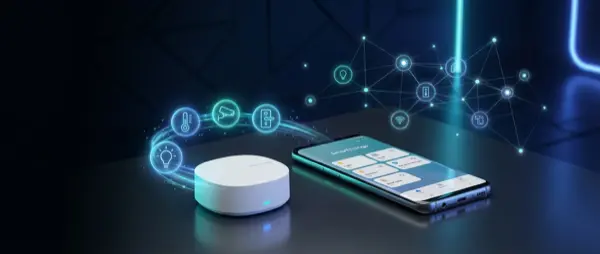
Samsung SmartThings is evolving rapidly in 2026. With full Matter support, deep Galaxy AI integration, a new SmartThings hub, and next-gen automations, Samsung wants to make SmartThings the central hub of your home. Is it worth it? What changed? Complete analysis.
SmartThings History
SmartThings started as a startup in 2012, was acquired by Samsung in 2014, and went through many changes: cloud-first architecture, migration to Edge drivers, Zigbee/Z-Wave/WiFi support, and now Matter. Samsung integrated it into Galaxy devices, Smart TVs, and Family Hub refrigerators, creating a closed but powerful ecosystem.
What Is New in 2026
1. Full Matter Support
SmartThings now fully supports Matter 1.3, the new standard that unifies all smart home ecosystems. This means you can use Matter devices from any manufacturer (Apple, Google, Amazon, IKEA) without restrictions. Samsung supports Matter over Thread and Matter over WiFi.
2. Galaxy AI Integration
With Galaxy AI, SmartThings learns your routines automatically. It uses sensor data from your Galaxy phone (GPS, accelerometer, time) to suggest automations. Example: I see you leave every day at 8 AM, would you like me to turn off lights and AC automatically? The AI analyzes usage patterns over several weeks before making suggestions.
3. New SmartThings Station Pro
New hub integrating: Thread Border Router, Zigbee 3.0, WiFi 6E, Bluetooth 5.3, and Matter controller. Also works as a Qi2 wireless charger (15W) for Samsung Galaxy phones. Price around 120 EUR in Europe.
4. SmartThings Energy 2.0
Upgraded energy dashboard: monitors consumption of every Samsung device (fridge, washer, AC, TV), suggests automatic savings, and integrates with solar panels via Open Energy API. Samsung promises 20% reduction in electricity bills with proper use of the Energy dashboard and its automatic energy saving suggestions.
SmartThings App
The SmartThings app (Android/iOS) is now a central dashboard for:
- All connected Samsung devices
- Matter/Zigbee/Z-Wave/WiFi third-party manufacturers
- Scenes with preset settings activated with one tap
- Routines providing automations based on time, location, sensors
- SmartThings Find for locating Galaxy devices and SmartTags
- Real-time energy monitoring
SmartThings vs Competitors
| Feature | SmartThings | Apple HomeKit | Google Home | Home Assistant |
|---|---|---|---|---|
| Matter | Full | Full | Full | Full |
| Zigbee | Yes | No | Yes (Nest) | Yes |
| Z-Wave | Yes | No | No | Yes |
| Thread | Yes | Yes | Yes | Yes |
| AI Automations | Galaxy AI | Basic | Gemini | Manual |
| Local Control | Partial | Yes | Partial | Full |
| Hub Price | ~120 EUR | ~130 EUR (Apple TV) | ~100 EUR (Nest) | ~50-100 EUR |
SmartThings Automations
SmartThings Routines are quite powerful:
- If-Then rules: If the door opens then turn on entry lights
- Location-based: If you leave home then turn off everything and activate cameras
- Time-based: Every day at 10 PM dim lights, turn off TV, set thermostat to 20 degrees C
- Device-triggered: If Samsung Jet Bot finishes cleaning then send notification
- Galaxy AI suggested: AI learns when you wake up and adjusts lights and thermostat before your alarm rings
Compatible Devices
SmartThings works with a huge range of products:
- Samsung: TVs, Family Hub fridges, washers, vacuums, air conditioners
- Lights: Philips Hue, IKEA DIRIGERA, Nanoleaf, LIFX
- Thermostats: Tado, Ecobee (via Matter)
- Security: Ring, Arlo, Yale/August (via Matter)
- Vacuums: Samsung Jet Bot, Roborock (via SmartThings connector)
- Voice: Bixby (native), Alexa, Google Assistant
Disadvantages
- Cloud dependency: Much still runs in the cloud. If it goes down, automations stop working
- Samsung-centric: Works best with Samsung devices. Third-party manufacturers may have delays
- Bixby: Samsung voice assistant is inferior to Alexa and Google. Use Alexa or Google instead
- Complexity: The app has many settings. Beginners may get confused during initial setup
- Edge drivers: Some custom integrations still require community Edge drivers
Who Is It For
- Samsung Galaxy, Smart TV, and appliance users wanting full ecosystem integration across all their devices
- Those wanting a ready-to-use Matter hub without any DIY complexity or technical setup
- Users who already own Zigbee or Z-Wave devices and need a compatible central hub
- Those looking for AI-powered automations without requiring any advanced technical knowledge
- Families who want a simple app that everyone can use to control the entire smart home from their phone
Getting Started
If you decide to go with SmartThings, here is the recommended path for beginners. First, download the SmartThings app on your Samsung Galaxy or iPhone. Second, purchase the SmartThings Station Pro hub (around 120 EUR) for the widest device compatibility. Third, connect your existing Samsung devices which will appear automatically. Fourth, add Matter or Zigbee devices from other brands. Fifth, set up your first Routines starting with simple ones like turning off all lights when you leave home. The entire initial setup takes about 30 minutes for basic functionality, and you can expand gradually over time.
Conclusion
Samsung SmartThings 2026 is an excellent and very comprehensive choice, especially if you already own Samsung devices in your home. With full Matter support, Galaxy AI automations, and the new Station Pro hub, it covers almost every smart home need. Cloud dependency remains a significant disadvantage compared to Home Assistant, but the ease of use and deep integration with the Galaxy ecosystem make a big difference for the average user who wants reliable smart home automation without specialized technical knowledge.