📖 Read more: Lighting Automation: Scenarios and Tips 2026
What Is a Motion Sensor?
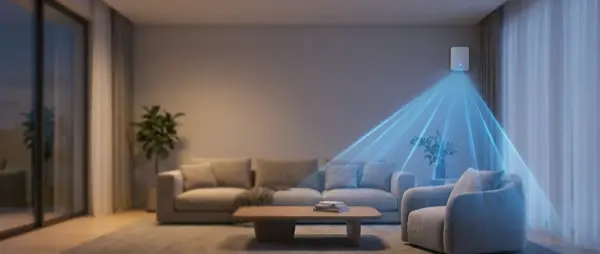
A motion sensor detects movement in a space and sends a signal to your smart home system. It's the most fundamental “sense” a smart home can have — without one, lights must be controlled manually, automations are limited to schedules only, and your security system can't “see” anything.
Detection Technologies
PIR (Passive Infrared) — The Classic
The most widespread technology. A PIR sensor detects changes in infrared radiation — essentially the heat emitted by a body in motion. Advantages: extremely low power consumption (2+ year battery life), cheap, reliable. Disadvantages: detects only motion (not presence — if you're sitting still on the couch, it doesn't “see” you), affected by ambient temperature, false alarms in warm rooms.
mmWave Radar — The Revolution
The new technology changing everything. The mmWave (millimeter wave) sensor emits radio waves and measures their reflections. It detects even the slightest movement — breathing, heartbeat, micro-movements. Result: true presence detection, not just motion. Lights never turn off while you're sitting still. Disadvantages: higher power consumption (typically requires USB power), more expensive.
Dual-Tech (PIR + mmWave)
Some premium models combine both technologies. PIR detects initial motion (fast trigger), then mmWave takes over for ongoing presence detection. Result: rapid detection + zero false positives.
| Feature | PIR | mmWave | Dual-Tech |
|---|---|---|---|
| Detects motion | ✅ Yes | ✅ Yes | ✅ Yes |
| Detects presence | ❌ No | ✅ Yes | ✅ Yes |
| Power Source | Battery (2+ years) | USB (continuous) | USB (continuous) |
| Price | €8-25 | €20-50 | €30-60 |
| False Alarms | Moderate | Low | Minimal |
| Detects through walls | ❌ No | ⚠️ Partially | ⚠️ Partially |
Best Models 2026
PIR Sensors
Aqara Motion Sensor P2 (€20-25): Zigbee 3.0, adjustable sensitivity, light sensor (lux), 170° detection angle, 7m range. Excellent Home Assistant integration. CR2450 battery lasts 5 years.
IKEA VALLHORN (€10-12): Matter over Thread, dual PIR sensors for wider field of view, built-in light sensor. Works without a proprietary hub via Matter. Outstanding value.
Philips Hue Motion Sensor (€40-45): Zigbee, adjustable daylight sensitivity, thermometer, magnetic mount. Premium but top-tier quality.
SONOFF SNZB-03 (€8-10): The cheapest reliable sensor. Zigbee 3.0, CR2450 battery, basic but works perfectly.
mmWave Presence Sensors
Aqara Presence Sensor FP2 (€45-55): The king of presence sensors. 24GHz mmWave, zone detection (knows which area of the room you're in), fall detection, WiFi. Works with HomeKit, Home Assistant, Alexa.
Aqara Presence Sensor FP1E (€25-30): The budget version of the FP2. mmWave, Zigbee 3.0, no zone detection but excellent for basic presence detection.
Everything Presence One/Lite (€30-40): Open-source mmWave sensor, ESPHome-based. Full Home Assistant integration, customizable, community-supported.
📖 Read more: Smart Home Dashboard: Build Your Own
Placement Strategy
Correct placement is the difference between a sensor that works perfectly and one that drives you crazy:
Placement Rules
- Height 2.0-2.4m: Ideal for PIR — too low loses range, too high loses accuracy
- Don't aim at windows: Sunlight and heat cause false alarms with PIR
- Don't aim at radiators: Heaters trigger PIR sensors
- Corner at 45°: PIR detects perpendicular movement best — place in room corners
- mmWave on ceiling: For room-level precision, mount the FP2 on the ceiling
- Away from pets: If you have cats/dogs, adjust sensitivity or use pet-immune sensors
How Many Do You Need?
For a typical apartment (80-100 m²):
- Basic coverage (3 sensors): Living room, kitchen, hallway
- Full coverage (5-7 sensors): + bathroom, bedrooms, balcony
- Premium (PIR + mmWave mix): mmWave in living room + office (presence), PIR in hallway + bathroom + bedrooms (motion)
Top Automations
Automation #1: Auto Lights
The classic automation. Motion detected → lights ON. No motion for 5 minutes → lights OFF. With an mmWave sensor, lights never turn off while you're sitting still.
Pro tip: Use the lux sensor — if there's enough natural light, don't turn on artificial lighting.
Automation #2: HVAC Control
No one detected for 30 minutes → AC OFF / thermostat to eco mode. Someone returns → restore temperature. Saves 15-25% on heating/cooling costs.
Automation #3: Security System
Alarm armed → motion detected → siren + push notification + camera recording. A DIY alarm system that replaces expensive monitored services.
Automation #4: Night Mode
After 11 PM, motion in hallway/bathroom → lights at 10% warm white instead of full brightness. Doesn't wake up the rest of the household.
Setup Cost
| Scenario | Sensors | Cost |
|---|---|---|
| Budget (3 rooms) | 3× SONOFF SNZB-03 | €24-30 |
| Value (5 rooms) | 5× IKEA VALLHORN | €50-60 |
| Smart Mix | 2× Aqara FP2 + 3× Aqara P2 | €150-170 |
| Premium Hue | 5× Philips Hue Motion | €200-225 |
Final Recommendation
For beginners: Start with 2-3 IKEA VALLHORN (€10 each, Matter). Place in hallway, living room, kitchen. Set up basic light automations via Google Home or Apple Home.
For enthusiasts: Aqara FP2 in the living room (presence) + Aqara P2 in the hallway and bathroom (motion) + Home Assistant automations. The ideal balance of cost and capability.
For power users: Everything Presence One (ESPHome mmWave) in every room + zone-based automations + Blueprint sharing. Full customization, open-source, community-driven.
The motion sensor is the first “sense” every smart home needs. Without one, your home is blind.