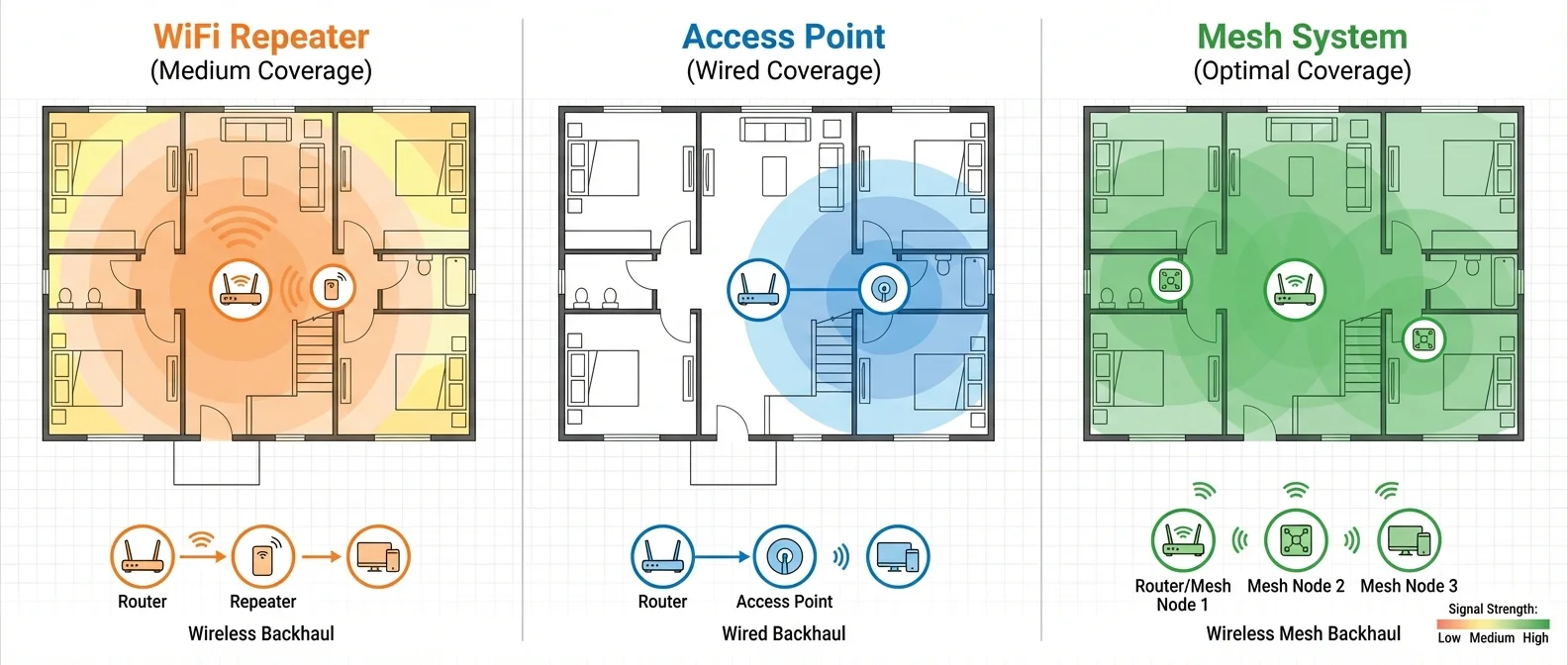
Your router's WiFi doesn't reach every corner of your home? The bedroom stutters, the balcony drops out, the upstairs floor is a dead zone. Whether you live in a 80 m² apartment with thick concrete walls or a 200+ m² house across multiple floors, the answer isn't always the same. There are three main solutions on the market: WiFi Repeaters, Access Points, and Mesh WiFi systems. Each has distinct strengths, weaknesses, and ideal use cases. In this guide, we break down all three, compare them head-to-head, and help you pick the one that fits your exact situation.
📡 WiFi Repeater: The Simplest (and Cheapest) Fix
The WiFi Repeater — also called a WiFi Extender — is the most common and budget-friendly solution for extending WiFi coverage. It's a small device that plugs into a wall socket (or connects via USB), picks up the existing wireless signal from your router, and rebroadcasts it, effectively creating a second network. Setup is usually done via WPS — press a button on both devices — with no cables or technical knowledge required.
Sounds perfect, but there's a fundamental catch: throughput drops by at least 50%. The reason is straightforward — since a repeater uses the same wireless connection to both receive and transmit, every data packet is sent twice (router→repeater→client instead of router→client). Only one wireless device can transmit at any given moment on a channel, so the airtime is effectively halved. If your router delivers 100 Mbps, through a repeater you'll get 50 Mbps at best — and in practice often less, because wireless interference is also doubled.
The quality of a connection through an extender is generally worse than a direct connection to the host router, especially in environments with many neighboring networks. Additionally, repeaters can introduce an extra security attack vector — particularly older models that don't support WPA2 or WPA3 encryption.
Repeater Pros
Very low cost (€20-60). Extremely easy WPS setup. No wiring needed. True plug & play — just plug in and go. Ideal for fixing a single dead spot in your home.
Repeater Cons
Speed loss of ≥50%. Doubled wireless interference. Separate SSID (manual network switching). Potential security gap on older models. Limited scalability — daisy-chaining repeaters degrades performance further.
Repeaters must be compatible with your router's WiFi standard and security protocol. An older model supporting only WPA2 connected to a WPA3 router could create security vulnerabilities. Placement is also critical: the repeater needs to be positioned where it still receives a strong signal from the router, yet close enough to the dead zone to be useful. Place it too far away, and it will rebroadcast an already weak signal.
🔌 Access Point: The Wired Powerhouse
An Access Point (AP) takes a completely different approach. Instead of wirelessly relaying the signal, it connects directly to your wired network (Ethernet) and creates a new WiFi hotspot. The connection between your router and the AP runs over a Cat5e/Cat6 cable or, alternatively, through Powerline adapters. This means zero speed loss — the wired backhaul delivers data at full gigabit speeds without the halving penalty that plagues repeaters.
Access Points support all modern WiFi standards up to WiFi 7 (802.11be), offer WPA2/WPA3 encryption, and many models support PoE (Power over Ethernet) — meaning they draw power through the same Ethernet cable, eliminating the need for a nearby power outlet. This makes them perfect for ceiling-mounted installations or locations without convenient access to electrical sockets. Each AP can typically handle 10-25 simultaneous clients, while enterprise-grade models support RADIUS authentication for business environments.
Access Point Pros
Zero speed loss (wired backhaul). Full bandwidth at every AP. PoE support — no power outlet needed. WPA3 + RADIUS security. Excellent reliability. Supports up to WiFi 7.
Access Point Cons
Requires Ethernet cabling (or Powerline). More complex installation. Cost of €50-200 per AP (consumer). No seamless roaming without a controller. Requires placement planning.
The big “but” with Access Points is the wiring requirement. If your home already has Ethernet ports or you can easily run cables, APs deliver the best raw performance of any solution. If not, installation becomes more complex and potentially expensive. Powerline adapters offer a workaround — they use your home's electrical wiring to carry network data — but their performance varies significantly depending on the quality and age of your electrical installation.
🏠 Mesh WiFi: The Modern Standard
Mesh WiFi systems represent arguably the biggest evolution in home networking in recent years. Instead of a single central device, you place multiple interconnected nodes throughout your home. These nodes form a unified network with mesh topology — each node communicates with its neighbors, and routing is handled dynamically without hierarchy.
The biggest advantage? Seamless roaming under a single SSID. As you move around your home, your device automatically switches to the nearest node without dropping the connection — no manual network switching, no clinging to a weak signal. If one node fails, the network self-heals and reroutes data through an alternative path. No single point of failure.
Modern mesh systems — like the TP-Link Deco BE85, ASUS ZenWiFi BQ16 Pro, and Netgear Orbi 970 — support WiFi 6E and WiFi 7, tri-band connectivity (2.4 + 5 + 6 GHz), and a dedicated backhaul band. This means they use an exclusive radio band solely for inter-node communication, without “stealing” bandwidth from your devices — overcoming the speed loss problem that plagues repeaters. On dual-band mesh systems, some speed loss still occurs, but it's significantly reduced thanks to intelligent routing.
Mesh Pros
Seamless roaming (single SSID). Self-healing network. Easy app-based setup. Dedicated backhaul on tri-band models. Excellent coverage for 100-400+ m². Easily scalable — just add more nodes.
Mesh Cons
Higher cost (€150-500 for 2-3 nodes). Wireless backhaul on dual-band = some speed loss. Vendor lock-in to one ecosystem. Fewer advanced settings for power users.
Setup is done through a companion app (TP-Link Deco, ASUS, Google Home, etc.) in just minutes: scan the QR code, place nodes in the rooms that need coverage, and the system configures itself. For even better performance, many mesh systems also support Ethernet backhaul — if you connect the nodes with cables, you get the benefits of both mesh (seamless roaming, self-healing) and access points (zero speed loss). This hybrid approach is the best of both worlds.
📊 The Big Comparison: Mesh vs Repeater vs Access Point
Now that you understand how each technology works, let's put them side by side. Each solution excels in different areas — there's no single “best” option for everyone, only the “best for you.”
📊 Complete WiFi Coverage Technology Comparison
| Feature | 🏠 Mesh WiFi | 📡 Repeater | 🔌 Access Point |
|---|---|---|---|
| Setup | Easy (app-based) | Very easy (WPS) | Moderate (wiring needed) |
| Speed loss | Minimal (dedicated backhaul) | ~50%+ reduction | None (wired backhaul) |
| Roaming | Seamless (single SSID) | Manual switching | Depends on controller |
| Coverage | Excellent (scalable) | Limited | Per-unit (consistent) |
| Cost | €150-500 (2-3 pack) | €20-60 | €50-200 per AP |
| Wiring required | No (wireless backhaul) | No | Yes (Ethernet) |
| Self-healing | Yes — automatic rerouting | No | No |
| Scalability | Add more nodes | Limited | Add more APs |
| Security | WPA3 | WPA2/WPA3 (model-dependent) | WPA3 + RADIUS |
| Best for | Large homes, multiple floors | Single dead zone, tight budget | Pre-wired buildings, offices |
The comparison makes it clear that each technology shines in different scenarios. Repeaters win on cost and simplicity. Access Points win on raw speed and enterprise-grade security. Mesh systems win on ease of use, wide-area coverage, and reliability. The right choice depends entirely on your specific circumstances.
💰 Cost & Value: What You Pay, What You Get
Budget is always a deciding factor. Let's break down what each euro gets you across all three categories, with February 2026 pricing in the European market.
In the Repeater category, €30-40 gets you a reliable WiFi 5 or WiFi 6 model from TP-Link, Xiaomi, or Netgear. It's the “budget fix” choice — quick and cheap, as long as you accept the speed trade-off. For a small apartment with just one dead spot, this might be all you need.
For Access Points, a TP-Link EAP245 or Ubiquiti U6 Lite runs around €80-120 and delivers exceptional performance. Add €20-40 for a PoE switch if you want power-over-Ethernet convenience. APs offer the best bang for your buck in terms of raw bandwidth — provided you have the cabling infrastructure.
In the Mesh category, a TP-Link Deco X55 (3-pack) starts around €180, while premium WiFi 7 mesh systems — ASUS ZenWiFi BQ16 Pro, Netgear Orbi 970 series — reach €400-500. You're paying for convenience, seamless roaming, self-healing, and “invisible” coverage that just works without technical expertise. For homes over 100 m² or multi-floor layouts, the investment pays for itself quickly.
🎯 Which One Is Right for You? A Buying Guide
There's no one-size-fits-all solution for WiFi coverage extension. The right choice comes down to three factors: space size, existing infrastructure (Ethernet or not), and budget. Here are the four most common scenarios:
📡 Scenario 1: Small Apartment (40-70 m²) — One Dead Spot
Recommendation: WiFi Repeater — If your router covers 80% of your home and only one room loses signal, a €30-40 repeater solves the problem quickly and cheaply. Place it halfway between your router and the dead spot. You don't need anything more expensive or complex.
🏠 Scenario 2: Large Home (100-300+ m²) or Multiple Floors
Recommendation: Mesh WiFi System — In homes with many rooms, multiple floors, or thick walls, a 2-3 node mesh system delivers uniform coverage everywhere. Seamless roaming means you move around without dropouts. No wiring required. Choose a tri-band model for dedicated backhaul with minimal speed loss.
🔌 Scenario 3: Home/Office with Ethernet Wiring
Recommendation: Access Point(s) — If the building already has Ethernet ports or you can easily run cables, APs deliver maximum possible speed with zero compromises. One or two PoE APs in strategic locations = full coverage at full speed. Ideal for offices and technically savvy users.
🏆 Scenario 4: I Want the Best Possible — No Compromises
Recommendation: Mesh + Ethernet Backhaul — The ultimate solution: a mesh system with nodes connected via Ethernet cables. You get seamless roaming + zero speed loss + self-healing. Cost: higher. Result: flawless WiFi in every corner of your home. If you can run cables, this is the gold standard setup.
✅ Conclusion
The “Mesh vs Repeater vs Access Point” battle doesn't have a universal winner — it has the right winner for each situation. A repeater is the quick, cheap fix for a single dead zone. An access point delivers the best raw performance when wired infrastructure exists. And mesh WiFi is the most complete, user-friendly solution for large spaces without technical requirements.
Before you spend a single euro, ask yourself: How big is my home? Do I have Ethernet ports? How many devices do I use simultaneously? Do I need seamless roaming? What's my budget? The answers to these questions will point you directly to the right solution — without overspending or sacrificing speed.
"For a small home on a budget, a repeater does the job. For a large home without wiring, mesh has no rival. For a space with Ethernet, nothing beats a proper Access Point. The right solution isn't the most expensive one — it's the one that fits your space."
— GReverse Guide, February 2026