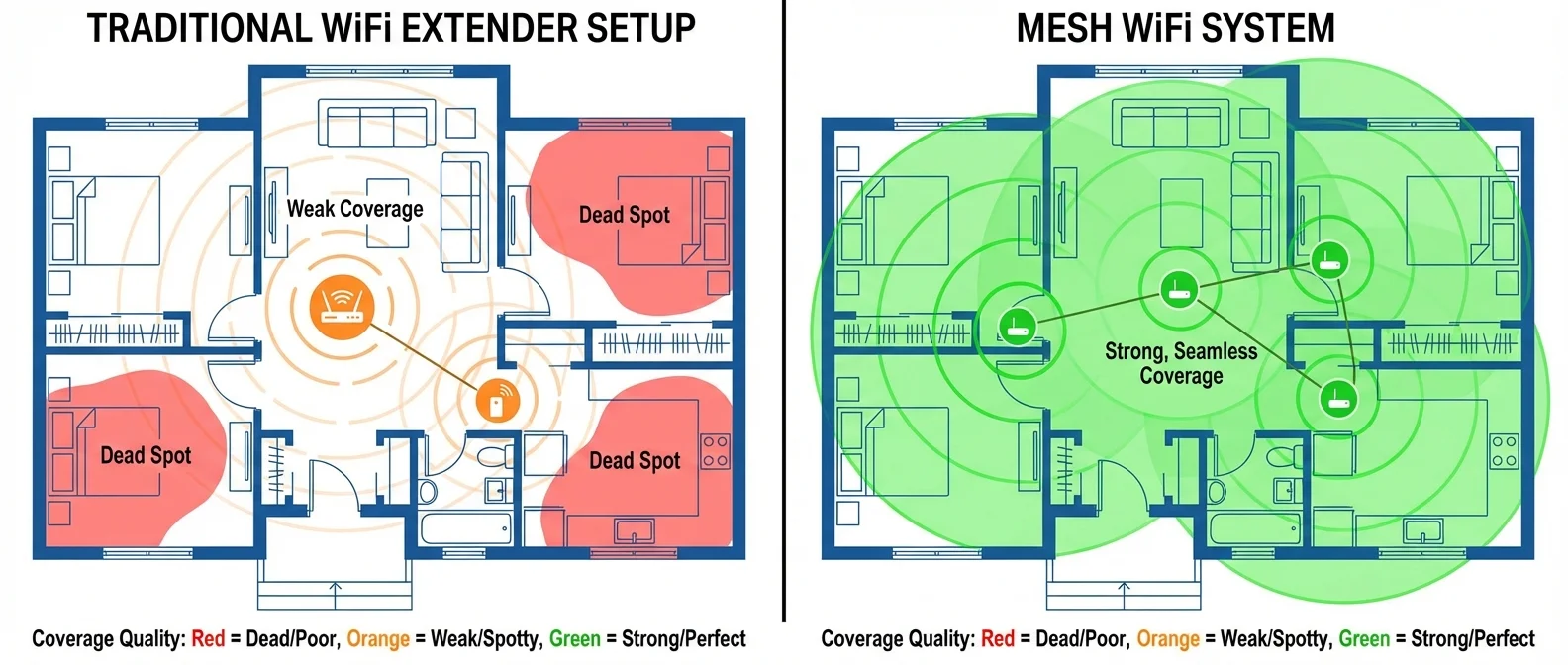
The WiFi doesn't reach the bedroom. It's the universal complaint in homes everywhere — especially in apartment buildings with thick concrete walls. The knee-jerk reaction: “I'll just grab an extender.” But is a mesh system the smarter choice? The difference isn't just about price — it's about architecture, raw performance, and your daily experience. In this guide, we break down everything: how each technology works, where each one excels, what they cost in Greece, and which is the ideal pick based on your specific needs.
📖 Read more: Router Setup: Tips for Faster Internet
What Is a WiFi Extender and How Does It Work?
A WiFi extender (also called a repeater) is a device that picks up your router's existing wireless signal and rebroadcasts it over a wider area. You place it somewhere between your router and the “dead zone” — the spot where signal fades out. The principle is straightforward: the device receives data wirelessly, decodes it, and retransmits it.
Sounds perfect, but there's a fundamental problem. Because the extender uses the same channel for both receiving and retransmitting, actual throughput drops by at least 50%. If your router delivers 100 Mbps, you'll get 50 Mbps through the extender at best — often less.
Key Drawbacks of WiFi Extenders
- Speed loss ≥50%: Retransmitting on the same channel cuts bandwidth in half
- Second network (SSID): Typically creates a separate WiFi network (e.g., “MyNet_EXT”) with no automatic handoff
- Doubled interference: Wireless “noise” doubles in the area — a real problem in apartment buildings
- Increased latency: Every data packet travels through the air twice, boosting delay
- Security gaps: Older extenders may not support WPA3, leaving potential vulnerabilities
Despite all this, WiFi extenders remain popular for one reason: they're cheap and dead simple to set up. Plug it in, press WPS, and you've got signal where there was none — in about 2 minutes. For someone with very basic needs — say, checking social media on the balcony — it might be enough.
What Is Mesh WiFi and How Does It Work?
A mesh WiFi system consists of two or more nodes that create a unified, self-managing network. Instead of simply reboadcasting a signal, each node communicates with the others, routing data through the most efficient path available. If one node goes down or gets congested, the network self-organizes around the problem — self-healing in real time.
The core difference compared to an extender: a single SSID across your entire home. Walk from the living room to the bedroom and your connection “follows” seamlessly — no disconnection, no manual network switching. Tri-band mesh systems use a dedicated backhaul channel for inter-node communication, completely avoiding the throughput loss that plagues extenders.
One Network Everywhere
One SSID, one password, uninterrupted connectivity throughout your home. Handoffs between nodes happen automatically and invisibly — no drops, no lag.
Self-Healing Network
If a node fails, the others reroute automatically. Fault-tolerant architecture means you never completely lose your connection.
Dedicated Backhaul
Tri-band systems reserve an entire band exclusively for node-to-node communication. Result: zero speed loss for your devices.
Intelligent Routing
Dynamic path selection based on network load, interference, and signal quality. Real-time optimization under the hood.
With WiFi 7 mesh systems (802.11be) available since 2024, the technology has taken a massive leap forward. Multi-Link Operation (MLO) enables simultaneous use of 2.4, 5, and 6 GHz bands, while 320 MHz channels and 4096-QAM deliver theoretical speeds up to 23 Gbps. In practice, a solid WiFi 7 mesh setup delivers a consistent 500-900 Mbps in every corner of a 100-150 sqm home.
Comparison: Extender vs Mesh vs Access Point
Wondering how all three WiFi extension technologies stack up? The table below paints a clear picture. For completeness, we've included wired access points — the “gold standard” for maximum performance.
Detailed Comparison Table
| Feature | WiFi Extender | Mesh WiFi | Access Point |
|---|---|---|---|
| Cost (Greece) | €15 – €50 | €120 – €350 | €80 – €200/unit |
| Setup | Plug & Play | Easy (app) | Ethernet cabling |
| Speed | ≥50% loss | Minimal loss | Full speed |
| Single SSID | No (2nd network) | Yes ✓ | Yes ✓ |
| Roaming | Manual | Automatic ✓ | Automatic ✓ |
| Latency | High (+20-50ms) | Low (+5-15ms) | Minimal (+1-3ms) |
| Self-healing | No | Yes ✓ | With controller |
| Security (WPA3) | Partial | Full ✓ | Full ✓ |
| Ideal for | Small space | Home 70-200 sqm | Large space / Business |
| Interference | Increased (x2) | Minimal (backhaul) | None (Ethernet) |
The access point is unquestionably the best solution in terms of raw performance, but it requires a wired Ethernet connection to each location — which in an already-finished home means tearing into walls. For most users, the real comparison comes down to extender vs mesh.
📖 Read more: Speedtest 2026: How to Measure Your Speed Correctly
By the Numbers: The Real-World Difference
These numbers illustrate why the extender vs mesh debate goes far beyond sticker price. An extender costs five times less, but it literally halves what you're paying your ISP for. If you have a 100 Mbps fiber connection and want to use it properly throughout your home, dropping to 40-50 Mbps via an extender cancels out a large chunk of your internet plan investment.
When to Choose an Extender vs Mesh
There's no single “best” option that works for everyone. The right gear depends on your space, your devices, and how you use the internet. Let's look at the most common scenarios:
Choose an Extender If...
- Your home is small (under 60 sqm)
- You need signal in just 1 extra room
- Your budget is below €50
- You only need basic browsing and social media
- You don't mind the speed cut
Choose Mesh If...
- Your home exceeds 80 sqm or has multiple floors
- You have 10+ devices (phones, laptops, TVs, IoT)
- You stream 4K, game, or work from home
- You want a single network with no dropouts
- Security (WPA3) is a priority
"An extender is like putting a megaphone on someone who's already speaking quietly — yes, you hear them further away, but the sound stays muffled. A mesh system is like placing a separate, crisp speaker in every room."
There's also a middle-ground option: if your router has an Ethernet port and you can run a cable to a second location, a standalone access point (€80-€200) gives you full speed without the extender's drawbacks — something between a budget fix and a premium solution.
Best Options in Greece 2026
The Greek market now offers solid choices in every category. Here's what's available in February 2026 and at what price points:
WiFi Extenders (€15 – €50)
The extender market is packed with budget options. The TP-Link RE315 and Xiaomi WiFi Range Extender Pro start at €15-€25 and cover basic needs. For something more reliable, the NETGEAR EX3700 or TP-Link RE505X (WiFi 6) range from €35-€50. In every case, remember: speed will drop by at least half.
Mesh WiFi Systems (€120 – €350)
In dual-band mesh, the TP-Link Deco M5 (2-pack) and Google Nest WiFi fall in the €120-€180 range — excellent value for homes up to 120 sqm. For tri-band, the ASUS ZenWiFi XT8 and TP-Link Deco X55 Pro start at €200 and bring a dedicated backhaul channel. Greek ISPs (Cosmote, Nova) also offer mesh boosters as add-ons to their broadband packages.
WiFi 7 Mesh Systems (€250 – €500)
For the most demanding users, WiFi 7 mesh systems sit at the top. The TP-Link Deco BE85 (2-pack), ASUS ZenWiFi BT10, and NETGEAR Orbi 970 start at €250 and go up to €500 for a full kit. They support MLO, 320 MHz channels, the 6 GHz band, and 4096-QAM — everything needed for gigabit speeds in every corner.
Greece 2026 Price Overview
| Category | Price Range | Ideal For |
|---|---|---|
| WiFi Extender | €15 – €50 | Small space, basic browsing |
| Mesh WiFi 6 (2-pack) | €120 – €200 | Home 70-120 sqm, many devices |
| Mesh Tri-band (2-pack) | €200 – €350 | Home 100-200 sqm, 4K streaming, gaming |
| Mesh WiFi 7 (2-pack) | €250 – €500 | Large space, gigabit needs |
| Access Point (per unit) | €80 – €200 | Wired infrastructure, max performance |
The Verdict
After this deep dive, the picture is clear: WiFi extenders remain a quick, cheap fix that fits very specific scenarios — a small space, low demands, a tight budget. In every other case, a mesh system is far and away the better investment.
The price drop in mesh WiFi 6 systems (now starting at €120 for a 2-pack) means the cost gap with a decent extender (€40-€50) no longer justifies the performance trade-offs. For homes over 80 sqm or with more than 10 devices, mesh delivers a consistently better experience: one network everywhere, automatic roaming, zero dropouts.
Our Recommendation
If you're thinking about buying an extender for more than €40, don't. Put a few extra euros toward an entry-level mesh system instead. The difference in daily experience — speed, stability, and ease of use — is dramatic. If your budget allows, a WiFi 7 mesh system will cover you for the next 5-7 years without any need to upgrade.
The future clearly belongs to mesh networks — and with WiFi 8 (802.11bn) on the horizon, multi-AP coordination technology will make mesh systems even more effective. If you invest in a quality mesh setup today, you'll be able to add nodes tomorrow without replacing the entire system. That scalability is mesh's greatest strength — and something no extender can ever offer.